

Every couple of years a familiar incident pattern surfaces in environments that use Microsoft Intune with on-premises Active Directory Certificate Services: SCEP enrollment quietly stops working. Wi-Fi profiles fail to renew. VPN connections drop. Devices fall out of compliance. The cause, almost always, is that one of several certificates in the NDES + Intune Certificate Connector stack has expired without anyone noticing — and the published renewal procedures in the wild are either out of date or give you 0x8007000d ERROR_INVALID_DATA instead of a new certificate.
This post documents a verified, minimal renewal procedure that works in 2026 against current Microsoft documentation, with a published PowerShell toolkit that automates the full flow.
The TL;DR is at the bottom. If you only need the working INF and the three certreq commands, skip to The five-line INF.
The certificate stack that quietly expires
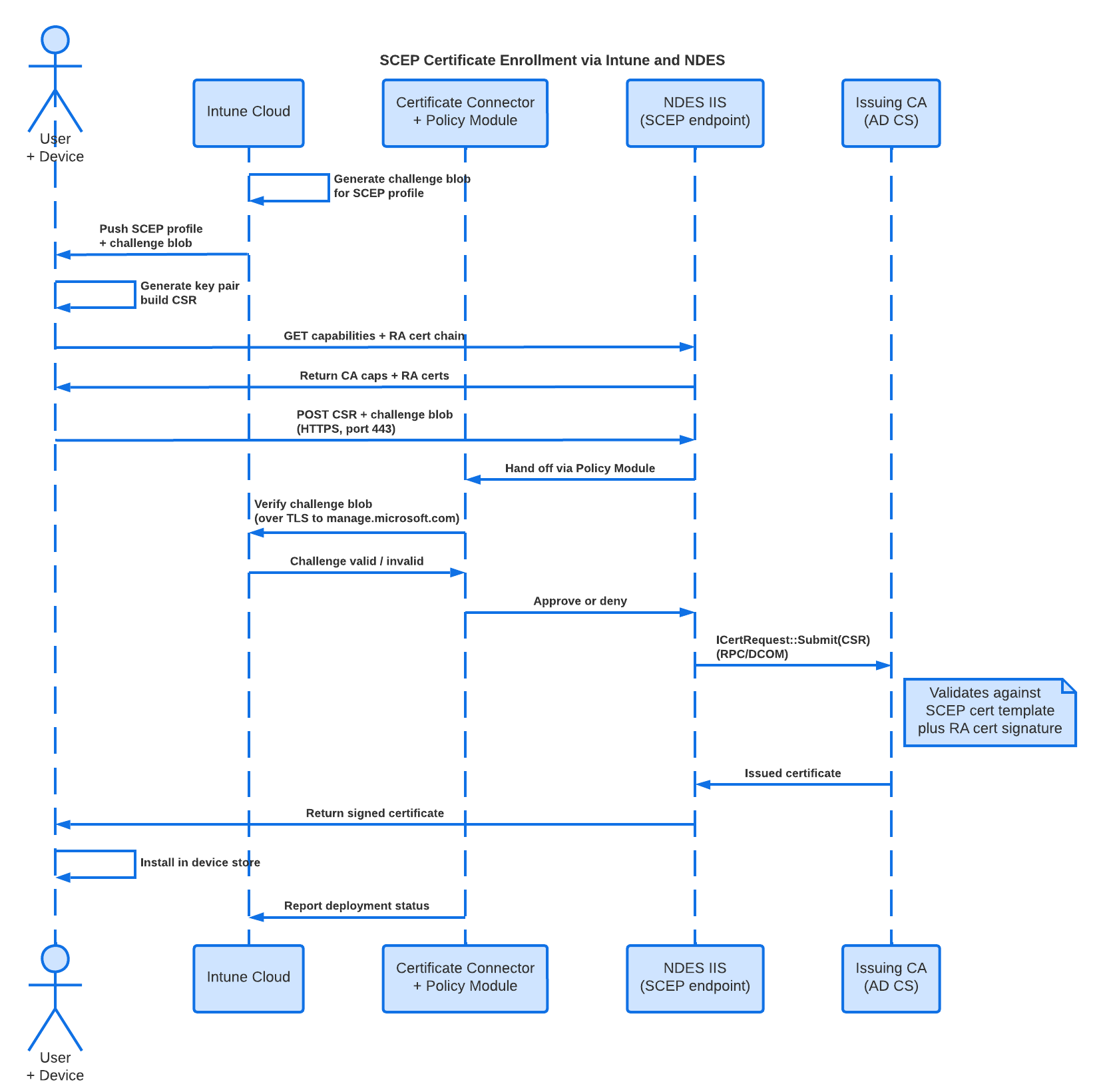
The Intune SCEP pipeline involves more moving parts than the admin UI suggests. The Microsoft troubleshooting guide for SCEP profiles describes the flow in six steps. The diagram below shows it as a sequence — including the parties most teams forget to monitor.
(Live diagram: view in Lucid)
What you can read out of that flow:
- Intune Cloud generates a challenge blob for each SCEP profile.
- The device receives the profile, generates a key pair, and posts the CSR plus challenge to NDES.
- The NDES IIS endpoint hands the challenge to the Certificate Connector’s policy module, which validates the challenge against Intune over TLS.
- If valid, NDES submits the CSR to the Issuing CA via RPC/DCOM.
- The signed certificate flows back to the device.
- The connector reports the deployment to Intune.
Every one of those arrows depends on a certificate somewhere. The ones that bite you:
| Certificate | Where it lives | Typical lifetime | Renewal mechanism |
|---|---|---|---|
| NDES RA: CEP Encryption | LocalMachine\My on the NDES server | 2 years | Manual via certreq |
| NDES RA: Exchange Enrollment Agent (Offline) | LocalMachine\My on the NDES server | 2 years | Manual via certreq |
| NDES SSL certificate | LocalMachine\My on the NDES server | per template | Manual via certreq or certlm.msc |
| Intune Certificate Connector identity (Microsoft Intune ImportPFX Conn) | LocalMachine\My on the NDES server | 1 year | Refreshed by Sign In in ConnectorUI.exe |
| Issuing CA certificate | The CA server | Variable | Customer-managed |
None of these surface in default Windows or Intune monitoring. The first warning sign is usually a wave of Event 34 in the NDES Application log, an outage in the wider environment, or both.
Why obvious renewal approaches fail
The two NDES RA certs sit at the heart of the problem. They are issued from templates with Subject Type = User:
CEPEncryptionEnrollmentAgentOffline(display name Exchange Enrollment Agent (Offline request))
That subject type matters more than it looks. From Microsoft’s own KB on NDES Enrollment Agent renewal:
Since the “Subject Type” of the certificate template “Exchange Enrollment Agent (Offline request)” is set to “User”, we won’t be able to renew the certificate template “Exchange Enrollment Agent (Offline request)” in MMC console (computer certificate store) due to mismatched type of subject. The error “Status: unavailable” would be returned in this situation.
The certs live in the LocalMachine store (because NDES needs them at machine scope), but the templates are user templates. That mismatch is what breaks most attempts. The three most common dead ends:
| Approach | Result |
|---|---|
Right-click cert in certlm.msc → Renew Certificate with New Key | Dialog shows the template as Unavailable: This type of certificate can be issued only to a user |
Build an INF with Subject, Provider, KeySpec, KeyUsage, and [RequestAttributes] CertificateTemplate = EnrollmentAgentOffline, plus MachineKeySet=TRUE | 0x8007000d ERROR_INVALID_DATA — “Machine context template conflicts with user context” |
| Add the service account to local Administrators temporarily and run certreq as the service account | Works but defeats the audit story; few security teams will accept it as a recurring procedure |
I burned through several more variants during incident response — Start-Process certreq.exe -Credential, runas /user:DOMAIN\svc_ndes, certreq -enroll -machine -cert <thumb> Renew, and other detours. The full list of what does not work and why is captured in the toolkit’s troubleshooting reference so others don’t have to repeat the discovery.
The five-line INF
The actual answer was published by Microsoft in 2012 in KB2712186 and popularized later by Jan Ketil Skanke in a 2020 MSEndpointMgr article. Both still work in 2026.
Create a file renewal.inf with exactly this content:
[Version]
Signature="$Windows NT$"
[NewRequest]
RenewalCert="<thumbprint of existing valid cert>"
MachineKeySet=TRUE
That is the entire file. No Subject, no ProviderName, no KeySpec, no KeyUsage, no [RequestAttributes] block with CertificateTemplate.
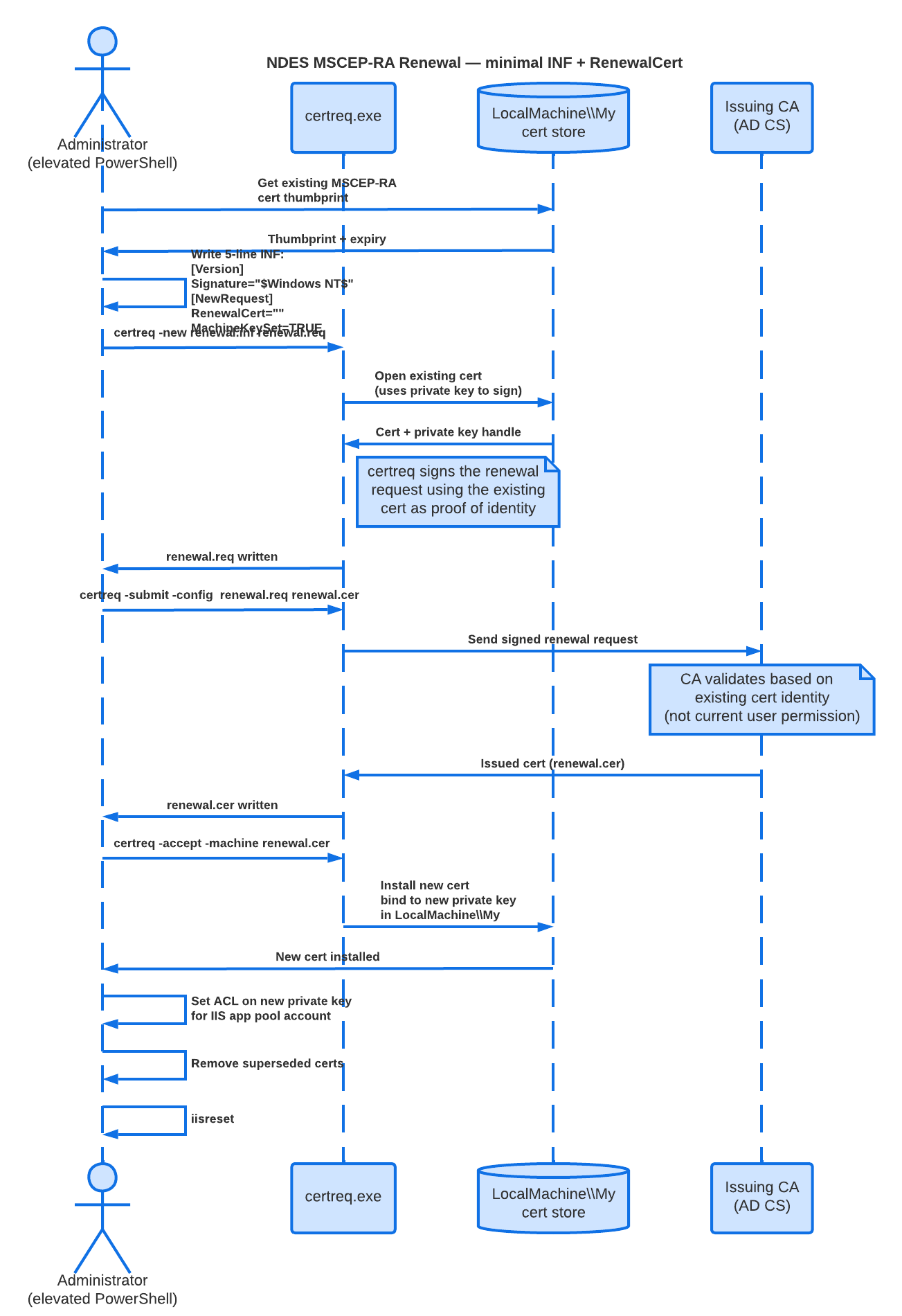
The magic is in RenewalCert. It tells certreq.exe to use the referenced existing certificate as the basis for the new request. certreq then signs the renewal request with the existing cert’s private key, and the CA validates the request against that cert’s identity — not against the running user’s template Enroll permissions. The current user only needs administrator on the local server, so that certreq can write the new private key to the machine cert store.
Run from an elevated CMD or PowerShell on the NDES server:
certreq -new renewal.inf renewal.req
certreq -submit -config "<ca-fqdn>\<ca-common-name>" renewal.req renewal.cer
certreq -accept -machine renewal.cer
That is all of it. Expected output:
-newwritesrenewal.req-submitreturnsCertificate retrieved(Issued) Issued-acceptinstalls the new cert inLocalMachine\Mywith a fresh 2-year lifetime
To get the CA config string, run certutil -config - -ping and pick the right entry.
The sequence is:
(Live diagram: view in Lucid)
Doing the full job with the toolkit
I packaged the renewal procedure plus the surrounding pre-flight and cleanup into a public PowerShell toolkit: github.com/maskovli/intune-cert-toolkit.
For an end-to-end renewal on a server:
git clone https://github.com/maskovli/intune-cert-toolkit.git C:\Tools\intune-cert-toolkit
cd C:\Tools\intune-cert-toolkit
Set-ExecutionPolicy -Scope Process -ExecutionPolicy Bypass -Force

# Optional: pre-flight health snapshot
.\src\diagnostics\Test-NdesHealth.ps1

# Renew both CEP and EEA, set ACL, remove old certs, restart NDES
.\src\remediation\Invoke-MscepRaRenewal.ps1 `
    -ServiceAccount "SPIRHEDLAB\svc_ndes" `
    -RemoveOldCerts `
    -RestartStack
What the script does, in order:
- Locates the newest valid CEP and EEA certs in
LocalMachine\My. - Auto-discovers the issuing CA from Active Directory’s
CN=Enrollment Servicescontainer (or accepts an explicit-CertificationAuthority). - Generates the five-line INF for each template.
- Runs
certreq -new,-submit,-accept -machinein the current admin session. - Grants the specified service account
Read,Synchronizeon the new private keys. - Removes superseded MSCEP-RA certs to prevent
0x80070057from duplicate templates. - Coordinates
iisresetplus restart of the connector services, then verifies Event 1 (“The Network Device Enrollment Service started successfully”) in the Application log.
-WhatIf is supported, so you can dry-run the whole sequence first.
The toolkit also ships seven other diagnostic scripts that I keep finding useful — Get-IntuneConnectorCertInventory.ps1 for the connector identity story, Test-UserRightsAssignment.ps1 for the SeServiceLogonRight question, Test-IntuneCloudConnectivity.ps1 for the firewall questions — and three runbooks for the three different failure modes I have seen in production:
- Runbook 00: Recovery after cert expiry — when NDES is fully broken and you need to bootstrap back
- Runbook 01: Event 29 connector reauth — when devices report
password cannot be verified - Runbook 02: MSCEP-RA renewal — the proactive 2-year case
Failure modes worth knowing about
A few traps I hit during the verification work, captured here for search engines:
Connector wizard parsing bug on service-account passwords. The Certificate Connector configuration wizard mangles certain shell metacharacters in the password field. If your service-account password contains any of $, `, &, ^, |, ;, <, >, %, the wizard will fail with logon errors and may lock out the account by retrying. Workaround: set a temporary ASCII-only password (A–Z, a–z, 0–9, -, !) before running the wizard, then rotate after. Better: migrate to a Group Managed Service Account (gMSA) and forget about it.
The wizard requires UAC elevation. Being logged in as an administrator account is not enough — ConnectorUI.exe must be launched with Run as administrator. Without that, the wizard fails on Stop service calls with Access is denied, and the error messages don’t make it obvious why.
Stale connector registrations don’t auto-clean. After Sign In Again the new registration appears as Active, but the previous one stays as Error indefinitely in Tenant administration → Connectors and tokens → Certificate connectors. Manual deletion is the only way.
Multiple certs per template confuse NDES. Over time LocalMachine\My accumulates expired and duplicate MSCEP-RA certs from successive renewals. NDES cannot disambiguate between multiple valid certs of the same template — it logs Event 10 followed by Event 2 with 0x80070057 E_INVALIDARG and refuses to start. The toolkit’s Repair-MscepRaCertStore.ps1 cleans this up.
Private key ACL mismatch after app pool identity changes. If the IIS SCEP app pool runs as one account but the MSCEP-RA private keys are ACLed for a previous account, NDES gets 0x80070057 trying to use a cert it can see but cannot decrypt with. The toolkit’s Set-MscepRaPrivateKeyAcl.ps1 reconciles this.
What to ship with any NDES deployment
The toolkit and runbooks fix the symptom. The root cause behind nearly every NDES outage I have responded to is the same: no one was monitoring certificate expiry. Operations teams watch services and CPU; certificate NotAfter dates are invisible until they’re not.
Three things every new NDES deployment should include from day one:
- Expiry monitoring at 60 / 30 / 14 days on the MSCEP-RA certs, the NDES SSL cert, and the Intune Connector identity certs. A scheduled task that emails
itops@example.comis trivial to write and saves the next outage. - gMSA for the NDES service account. AD owns the password, no human ever types it, rotation is automatic every 30 days, and the wizard parsing bug becomes irrelevant.
- Renewal runbook delivered with the solution — not “we’ll write it later”. Documented procedure with the actual CA name, template names, server names. Calendar reminder 30 days before next RA cert expiry.
The toolkit is MIT-licensed; treat it as a starting point or pick parts of it that fit your environment.
Strategic note: Microsoft Cloud PKI
The procedure above keeps your existing NDES + Certificate Connector + on-prem CA stack alive. That stack works, and it remains the right answer for organizations that need PKCS imported certificates for S/MIME, complex CA hierarchies, or strict data-residency control.
For everyone else, the operational case for moving off NDES is getting stronger. Microsoft Cloud PKI for Intune replaces the entire on-prem chain for SCEP scenarios with a managed service:
- No NDES server. No IIS endpoint to publish, no MSCEP-RA certs to renew, no Application log to monitor.
- No Certificate Connector. No identity certs that expire every year and need an interactive Sign In to refresh.
- No on-prem CA dependency (or bring your own). You can run a two-tier hierarchy fully in the cloud, or anchor a cloud Issuing CA to your existing on-prem root via Bring Your Own CA (BYOCA).
- HSM-backed keys via Azure Managed HSM at no extra Azure subscription cost.
- CRL and AIA endpoints hosted by Intune.
Cloud PKI is what most of the operational pain in this post — including the certificate stack that quietly expires — was designed to eliminate. It supports the same Intune client platforms (Android, iOS/iPadOS, macOS, Windows) and issues leaf certificates via the same SCEP profile mechanism.
Where it doesn’t fit (yet)
A few things to be aware of before betting the farm on Cloud PKI:
- Max 6 CAs per tenant. Counts include cloud Root, cloud Issuing, and BYOCA Issuing CAs.
- No PKCS imported certificates. Cloud PKI is SCEP-only. If you deploy S/MIME signing/encryption certs via Intune today using PKCS imported profiles, you still need the on-prem Certificate Connector for that scenario.
- No data residency option as of the current release — keys are managed in Azure regions chosen by Microsoft.
- Admin center certificate browser shows the first 1,000 issued certs per CA; full inventory requires
Devices → Monitor → Certificates. - Licensing. Requires Intune Suite or standalone Cloud PKI add-on in addition to Intune Plan 1/2.
What this means for the toolkit
I plan to extend the toolkit with a Cloud PKI module — diagnostics for cloud-issued certs, BYOCA configuration helpers, and a migration runbook from NDES to Cloud PKI. The repo will be updated when that work lands. In the meantime, the toolkit as it stands remains relevant: even organizations migrating to Cloud PKI typically keep NDES running in parallel during the transition, and the NDES renewal procedure documented here is still required to keep that intermediate state alive.
Worth doing, in priority order:
- If you’re standing up new SCEP today — evaluate Cloud PKI first. Compare licensing against the operational cost of one more NDES server.
- If you’re already on NDES — fix the immediate renewal pain with the procedure above. Then schedule a Cloud PKI evaluation as a separate workstream, not a fire drill.
- If you need PKCS imported certs for S/MIME — keep the Certificate Connector. Cloud PKI does not replace that path.
TL;DR
If you only need the working procedure:
[Version]
Signature="$Windows NT$"
[NewRequest]
RenewalCert="<thumbprint of existing valid MSCEP-RA cert>"
MachineKeySet=TRUE
certreq -new renewal.inf renewal.req
certreq -submit -config "<ca-fqdn>\<ca-common-name>" renewal.req renewal.cer
certreq -accept -machine renewal.cer
Run as administrator. No service account, no runas, no INF with twenty directives. The full toolkit is at github.com/maskovli/intune-cert-toolkit.
Sources and further reading
- Microsoft Learn: Troubleshooting SCEP certificate profiles with Intune — the canonical six-step flow diagram
- Microsoft Learn: Configure infrastructure to support SCEP with Intune — current prerequisites and setup
- Microsoft Learn: Certificate Connector for Microsoft Intune overview — connector capabilities and architecture
- Microsoft Learn: Renewal of “Enrollment Agent” certificate used by NDES may fail (KB2712186) — the original five-line INF reference
- Microsoft Learn: Overview of Microsoft Cloud PKI for Intune — Cloud PKI architecture, features, and limitations
- MSEndpointMgr: How to renew NDES service certificates for usage with Microsoft Intune by Jan Ketil Skanke — extended walkthrough
- GitHub: maskovli/intune-cert-toolkit — published PowerShell scripts, runbooks, and toolkit issues for follow-up work